Physical therapy and allied health

Keep appointments moving. Give reception a clearer day.

Calbok brings your booking page, provider availability and team calendar together. Use it for the appointment work around your practice, alongside your existing clinical records system.

Read the workflow and self-service setup guide below.

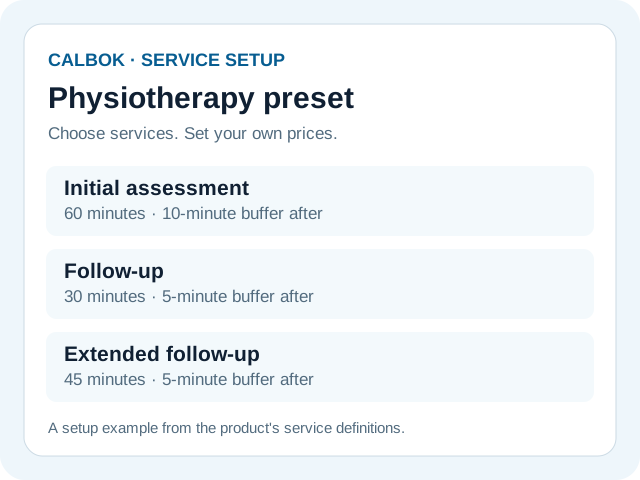
Physiotherapy setup example showing initial assessment, follow-up and extended follow-up durations and buffers
Service durations and buffers from Calbok's physiotherapy setup preset. Your practice chooses its prices.

From the booking page to the working calendar

Start with your services

Choose service durations and buffers. The physiotherapy preset includes a 60-minute initial assessment with a 10-minute buffer, a 30-minute follow-up with a 5-minute buffer and a 45-minute extended follow-up with a 5-minute buffer. Adjust the setup for your practice.

Make availability easy to find

Publish the availability your team offers. Share a booking link or QR code, or add a Book now button to your website that opens the booking page.

Give reception the right access

Front desk staff can book and manage appointments. Providers see their own schedules and manage their time off. Administrators manage settings, staff, reports and billing.

Keep follow-up close to appointments

Configure email confirmations, reminders, review requests and recall messages. Review cancellations, missed appointments and provider revenue through business reporting.

Plan for everyone who needs access

Three providers including the owner plus a receptionist use four team logins and fit Pro at $49 USD monthly. Four providers plus a receptionist need five logins and fit Max at $199 monthly.

Max allows 25 total team logins including the owner, with a separate allowance of 25 provider calendars. Customers do not use team logins.

See all plan limits and billing details.

Keep clinical work in its existing system

Use Calbok for scheduling and practice administration. Keep clinical histories, diagnoses, treatment records and insurance information in your clinical system.

Read the customer CSV import guide. Import administrative contact details yourself; a full clinical migration is not part of this workflow.

Demo coming soon

Read the setup guide while the video is being prepared.

Open the setup guide · Ask a product question

Set up at your own pace

  1. Add your business, location and timezone.
  2. Choose services, durations and buffers, then add provider working hours.
  3. Assign staff access and check the booking page with fictional data.
  4. Review the saved appointment and cancellation before sharing a booking link.

Open the self-service Help guide. Hosted evaluation payments are simulated. Use fictional information and no real card during the test phase.

Allied-health teams

Calbok also has setup presets for chiropractic, massage therapy, occupational therapy, sports therapy and other clinics. Presets supply booking labels and timing suggestions; your team chooses which services to offer.

App languages

The app includes English, Spanish, Brazilian Portuguese, Arabic, German, French, Japanese, Italian, Hindi and Simplified Chinese. Available language choices depend on the installation. This website and its Help article are in English.

Compare Cliniko · Compare Jane App · Ask a product question